
Automating Image Processing with AWS Serverless Computing
A Journey Through S3, SQS, Lambda, and Klayers

I Want to Automate Everything!
I am working on an image classification machine learning project. With 10,000 images (just phase one) that need to be standardized, transformed, and normalized for the machine learning model. This is just the beginning, as I plan to add more images in the future., the last thing I want to do is manually process them. I mean, sure, I could manually run scripts over and over again, but that wouldn’t be an efficient use of my time. So, why not let AWS do the heavy lifting?
That’s exactly what I decided to do: automate the whole thing using AWS serverless architecture. If you’re working on a similar ML project, or just curious about how to handle large-scale image processing efficiently, you’re in the right place.
My AWS Serverless Architecture
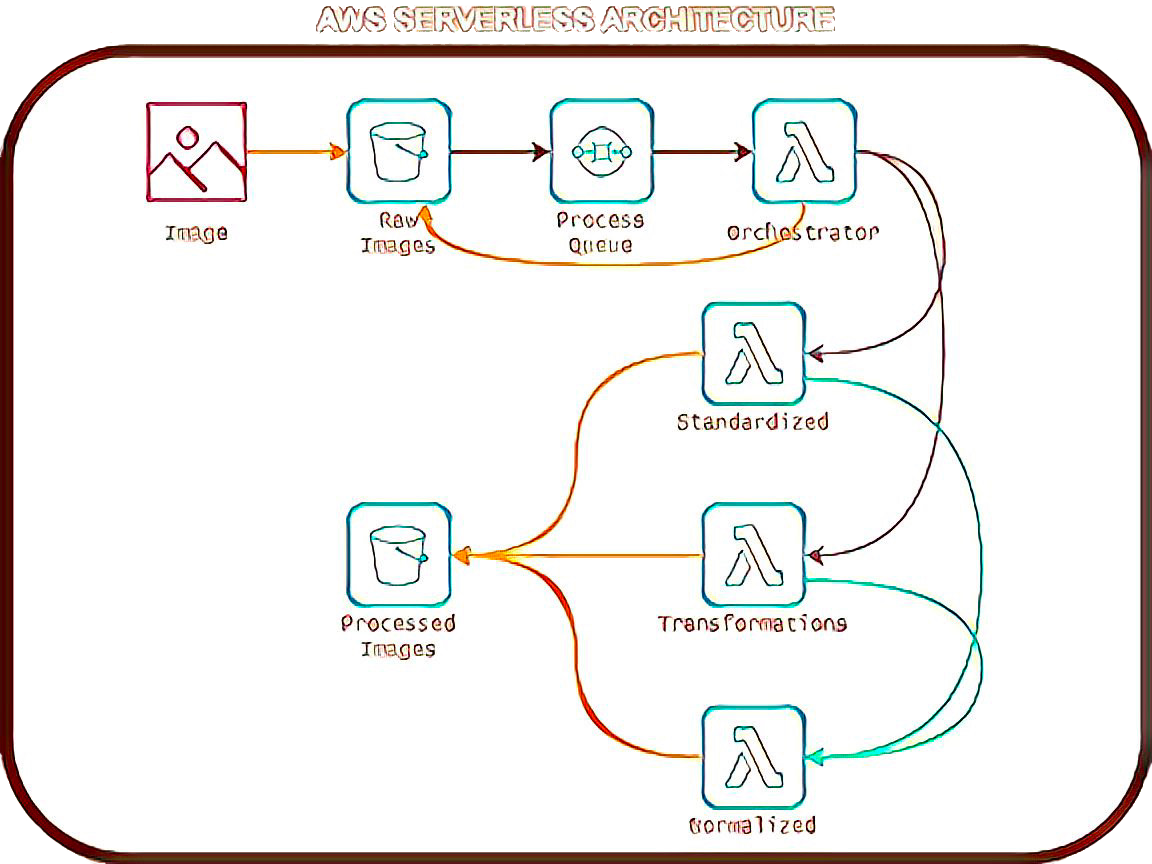
1. S3 (Amazon Simple Storage Service)
This is where I dump all my raw images.
Also serves as the destination for processed versions.
2. SQS (Amazon Simple Queue Service)
Acts as the middleman. When a new image lands in S3, an event triggers SQS.
SQS ensures my processing pipeline doesn’t get overwhelmed by too many requests at once.
3. Lambda (Serverless Compute Service)
The real workhorse here. I have Lambda functions set up to:
Standardize images
Create different transformations (blur, rotation, etc.)
Normalize images for CNN ingestion
By connecting these three, I’ve got a fully automated, serverless image pipeline that scales on demand. No need to manage servers or worry about compute costs when nothing is running. It just works.
Why Python? Because it's in my wheelhouse.
Since I was already comfortable with Python, I decided to use it for my AWS Lambda functions. Here’s why that was a solid choice:
Strong ecosystem – Tons of libraries for image processing (Pillow, OpenCV, etc.).
Easy to work with – Simple syntax means I spend more time building and less time debugging.
AWS-friendly – Python is natively supported in AWS Lambda, so deployment is a breeze.
That said, Lambda has a catch: the default environment doesn’t include all the libraries you might need. That’s where AWS Lambda layers come in.
Lambda Layers Learning Curve
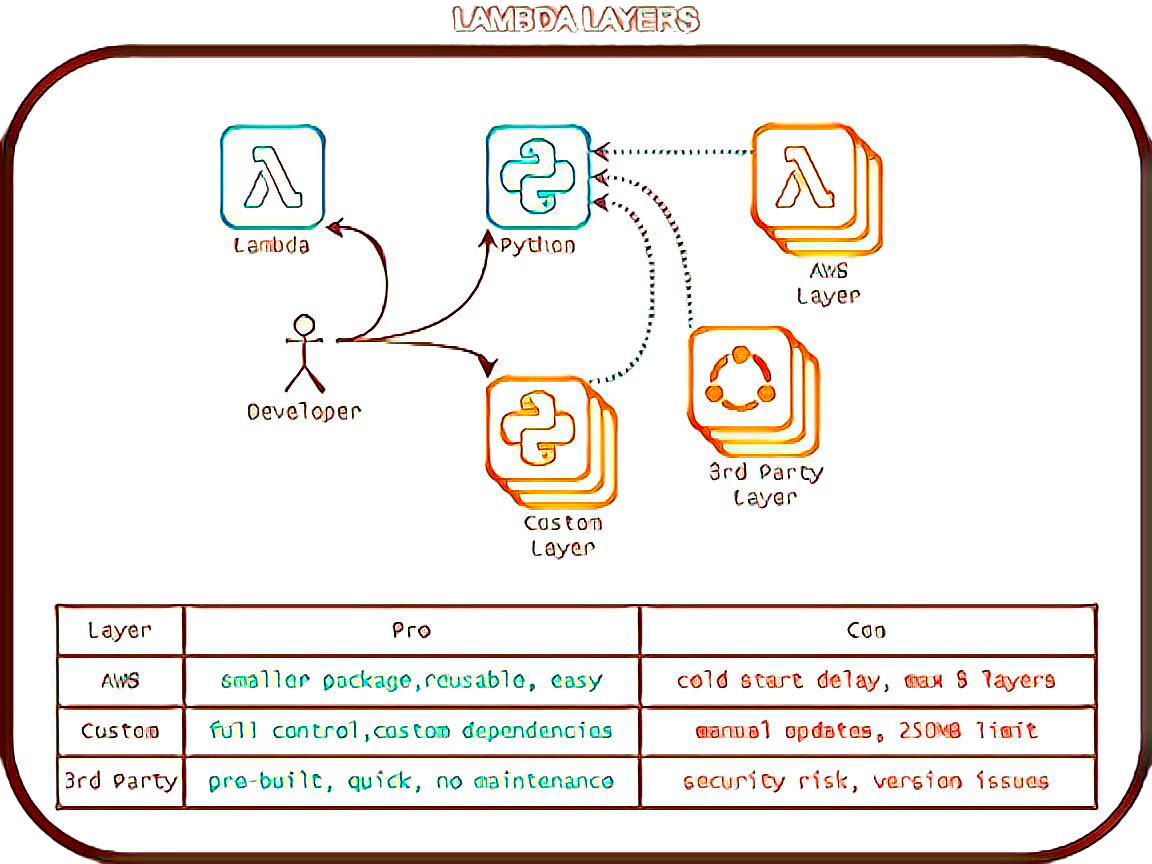
A Lambda layer is basically a packaged set of dependencies that your function can use. Instead of bloating my Lambda function with extra libraries, I figured I’d create a custom layer with all the dependencies I needed. Sounds easy, right? Ha.
Let’s just say I underestimated how much patience I needed. Building a Lambda layer meant packaging my dependencies, uploading them to S3, creating a layer in AWS, and then referencing it in my function. It was... a lot.
That’s when I discovered Klayers.
Klayers: The Game-Changer for AWS Lambda Dependencies
Klayers is a collection of pre-built AWS Lambda layers that include popular Python packages. Instead of packaging and uploading my own layer, I could just pull in an existing one by referencing its Amazon Resource Name (ARN).
Why Klayers is a Fantastic Option:
Saves time – No need to package dependencies manually.
Regularly updated – Maintainers keep packages fresh and functional.
Simple to use – Just add the ARN to your Lambda function, and you’re good to go.
Community-driven – It’s great to see open-source solutions making AWS Lambda development easier for everyone.
Considerations for Enterprise Use:
Not AWS-official – It’s a community project, not an AWS service.
Security & reliability? – While Klayers is great, relying on third-party layers means ensuring they meet enterprise security requirements.
That said, Klayers is an invaluable resource, and I hope to see it continue evolving into an even stronger solution for AWS Lambda developers. Keith Rozario and the contributors are doing amazing work, and with continued improvements in security and reliability, Klayers could become an essential tool for both hobbyists and enterprises alike.
Is Klayers Enterprise-Ready?
Short answer? It depends on your risk tolerance and security policies.
Longer answer? With the right steps, Klayers can absolutely become enterprise-ready. To build confidence in Klayers for enterprise adoption, third-party auditing and reporting could help ensure:
Automated security scans and dependency verification are in place.
Cryptographic signing is used to verify integrity.
Semantic versioning and long-term support are consistently maintained.
Compliance with AWS best practices is documented and transparent.
Independent reviews of these areas would provide additional assurance for organizations considering Klayers for production use.
While I haven’t done a deep dive into its security model, I believe Klayers has the potential to gain widespread enterprise adoption with the right safeguards in place. I’ll definitely be keeping an eye on its progress.
Wrapping It Up
So here’s where I landed:
AWS serverless architecture is a game-changer for automating ML image processing.
Python and AWS Lambda make a great combo, but managing dependencies is a pain.
Klayers simplifies Lambda dependencies, and it’s only getting better.
Would I do anything differently? Maybe. But for now, my serverless image pipeline is humming along, and I’m not manually processing thousands of images. I call that a win.
Got thoughts? Questions? A better way to do this? Drop a comment-I’d love to hear how others are handling this kind of workflow!